Getting Started with DTOs

A DTO is a plain C# class used to transfer data between layers (e.g., from your API to your Blazor client). It helps decouple your internal models from what you expose externally.

Create DTOs in a Shared Project

To share DTOs between your Blazor WASM and API:

  • Create a Shared project (e.g., MyApp.Shared)
  • Add DTO classes there so both the Blazor client and API can reference them.
// MyApp.Shared/DTOs/ProductDto.cs
public class ProductDto
{
    public int Id { get; set; }
    public string Name { get; set; } = string.Empty;
    public decimal Price { get; set; }
}

In your ASP.NET Core Web API:

[ApiController]
[Route("api/[controller]")]
public class ProductsController : ControllerBase
{
    [HttpGet]
    public ActionResult<List<ProductDto>> GetProducts()
    {
        var products = new List<ProductDto>
        {
            new ProductDto { Id = 1, Name = "Widget", Price = 9.99M },
            new ProductDto { Id = 2, Name = "Gadget", Price = 19.99M }
        };
        return Ok(products);
    }

In your Blazor client project:

@inject HttpClient Http

@code {
    private List<ProductDto>? products;

    protected override async Task OnInitializedAsync()
    {
        products = await Http.GetFromJsonAsync<List<ProductDto>>("api/products");
    }
}

Or use a service class:

public class ProductService
{
    private readonly HttpClient _http;

    public ProductService(HttpClient http)
    {
        _http = http;
    }

    public async Task<List<ProductDto>?> GetProductsAsync()
    {
        return await _http.GetFromJsonAsync<List<ProductDto>>("api/products");
    }
}

Tips for DTO Design

  • Keep DTOs flat and simple.
  • Avoid exposing domain entities directly.
  • Use nullable types if fields may be missing.
  • Use records if immutability is preferred:

Why You Shouldn’t Hardcode Values in Software Engineering

Hardcoding values—embedding fixed data directly into your code—might seem convenient at first, but it’s a shortcut that often leads to long-term pain. Here’s why software engineers should avoid it:

1. Poor Maintainability

When values are hardcoded, changing them requires digging through the codebase. This increases the risk of missing instances or introducing bugs. Instead, using configuration files, environment variables, or constants makes updates easier and safer.

2. Reduced Flexibility

Hardcoded values limit your ability to adapt to different environments (e.g., dev, QA, prod). For example, a hardcoded database connection string or API key means you can’t easily switch contexts without modifying the code itself.

3. Testing Challenges

Unit tests and integration tests often require different inputs. Hardcoded values make it harder to inject test data, leading to brittle or less meaningful tests.

4. Security Risks

Embedding sensitive information like passwords or tokens directly in code can expose them to version control systems or unauthorized access. Externalizing secrets to secure vaults or environment variables is a safer approach.

5. Violates DRY Principle

Hardcoding often leads to duplication. If the same value is used in multiple places, and it changes, you’ll need to update it everywhere—violating the “Don’t Repeat Yourself” principle.


In summary, hardcoding values might save time today, but it costs you tomorrow in maintainability, flexibility, and security. Embrace configuration, constants, and dependency injection to build robust, scalable software.

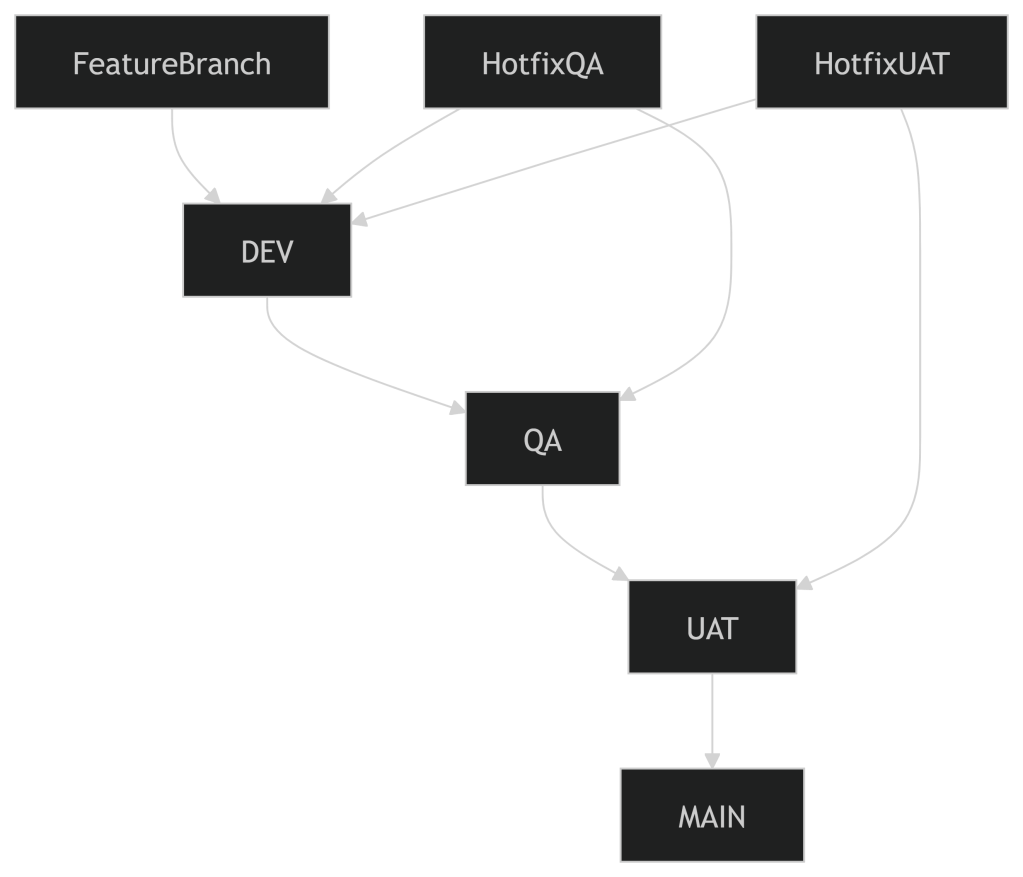
Effective Workflow Management in Git Branching

🧩 Branch Roles & Responsibilities

1. DEV Branch

  • Purpose: Active development, feature integration, and bug fixes.
  • Best Practices:
    • Developers work in feature branches off DEV.
    • Use pull requests with code reviews before merging.
    • Keep DEV stable enough for integration testing.
    • Rebase or merge MAIN into DEV regularly to stay up-to-date.

2. QA Branch

  • Purpose: Integration testing and bug fixing in a controlled environment.
  • Best Practices:
    • QA is updated from DEV when a sprint or feature set is ready.
    • Bug fixes found in QA should be made in hotfix branches, then merged into both QA and DEV.
    • Avoid direct commits to QA unless absolutely necessary.
    • Tag builds for traceability.

3. UAT Branch

  • Purpose: Final validation by business stakeholders.
  • Best Practices:
    • UAT is updated from QA after successful QA testing.
    • Only critical fixes should be allowed here, ideally via hotfix branches.
    • Keep UAT clean and stable for business sign-off.

4. MAIN (or PROD) Branch

  • Purpose: Production-ready code.
  • Best Practices:
    • Only merge into MAIN from UAT after approval.
    • Use release tags and maintain a changelog.
    • Protect MAIN with branch policies (e.g., no direct commits, required reviews).
    • Consider using release branches if multiple versions are supported.

✅ Additional Tips

  • Automation: Use CI/CD pipelines to automate testing and deployments between branches.
  • Branch Naming: Use consistent naming like feature/loginhotfix/qa-bug-123release/v1.2.0.
  • Documentation: Maintain a branching policy document for your team.
  • Communication: Ensure everyone understands the flow and responsibilities.